GMC Truck HMI —
Driver & Center Cluster for 2030s
A semester-long industry engagement with General Motors — designing the HMI experience for a next-generation GMC truck, covering the driver cluster and center display for the 2030s. Our team also proposed two original features: Oasis Mode and Guardian Mode.
Client
General Motors
Vehicle
GMC Hummer EV
Role
UX Designer · Lead Visual
Timeline
Jan – Apr 2025
Team
3 designers
Confidentiality Notice
This concept project was developed in collaboration with General Motors through a GM + UMSI university-sponsored design challenge. Certain research findings and implementation details have been omitted or generalized in accordance with the signed NDA. Full prototype and documentation available to verified recruiters upon request.
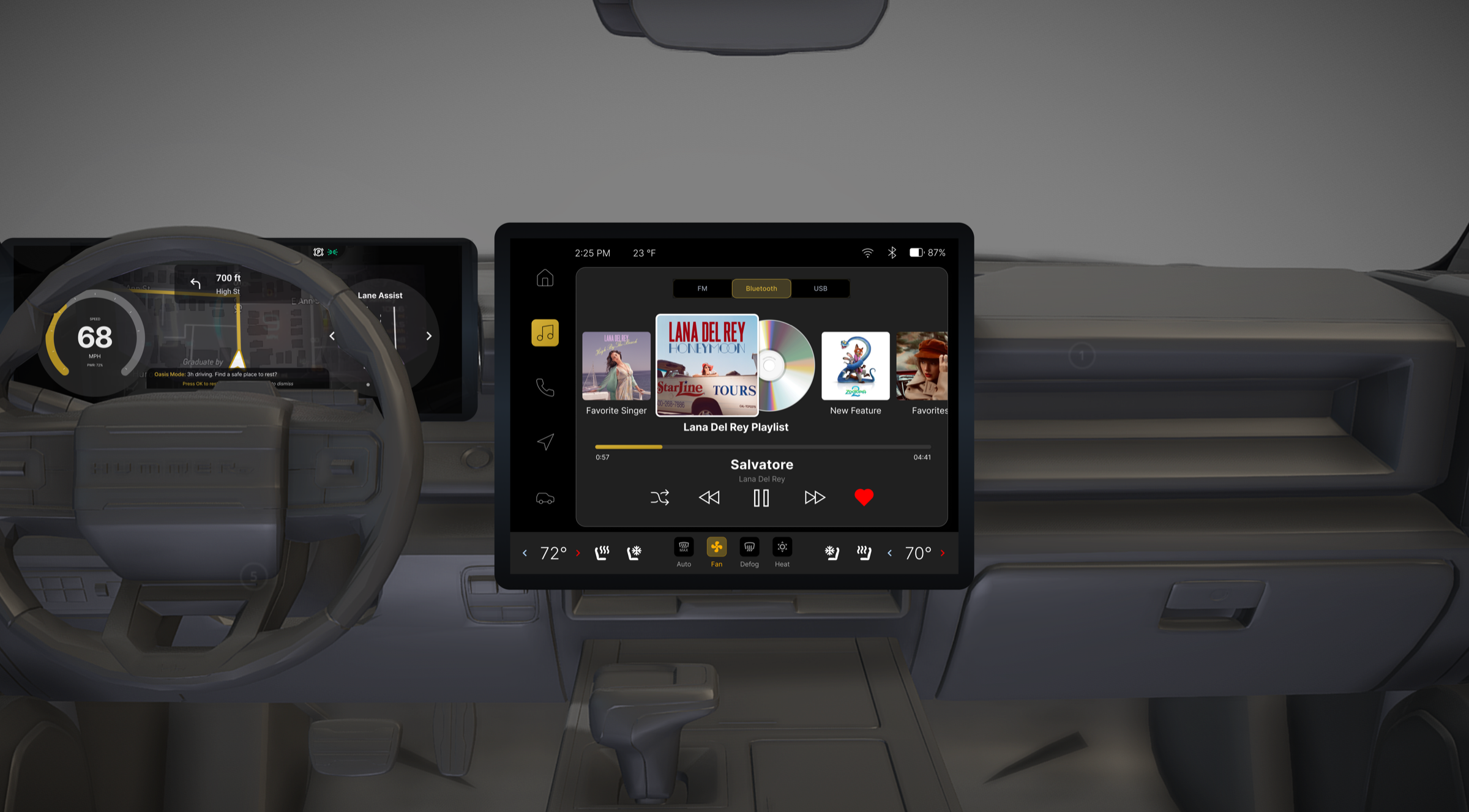
✦ SITUATION — OVERVIEW
Treating the car as one connected system
The team covered the full IVI scope: media, phone, navigation, vehicle controls, and driver cluster. I led the visual design direction and was the primary Figma builder — establishing the component library, layout rules, and visual system everyone built on top of.
Beyond the core HMI, we proposed two original features: Oasis Mode (in-car wellness, my primary focus) and Guardian Mode (vehicle security, which I pivoted from an in-car screen to a companion phone app after identifying a use case mismatch).
✦ DESIGN SCOPE
Home
Dashboard, quick controls, contextual widgets
Media
Playback, queue management, source switching
Phone
Calls, contacts, messaging integration
Navigation
Turn-by-turn, map states, routing
Vehicle Controls
Wipers, mirrors, lights, cabin — includes Oasis Mode
✦ Oasis Mode — primary focus
In-car wellness feature within Vehicle Controls. Preset recovery programs (seat massage, soundscape, lighting), active session screen, and a post-session health summary shown on both center display and driver cluster.
· Guardian Mode — secondary focus
Originally scoped for the HMI, but moved to a companion phone app — the use case (vehicle security while parked) is better suited to a device you carry with you. Walk Mode, Sentry Mode, Occupied Mode, and threat response flows.
✦ ACTIONS — PROCESS
From driver context to full system
We followed a double-diamond process with client review checkpoints throughout the semester. Competitive analysis covered Tesla, Rivian, and existing GM products. IA mapping ensured features shared consistent navigation patterns across the center display and driver cluster. We iterated from lo-fi flows to component-based hi-fi prototypes, presenting to GM design leads at each major milestone.
Discover
- Competitive analysis
- Driver context research
- Client brief + constraints
Define
- IA mapping
- User flows
- Design principles
Develop
- Lo-fi wireframes
- Component library
- Visual system
Deliver
- Hi-fi prototypes
- Client presentation
- Handoff specs
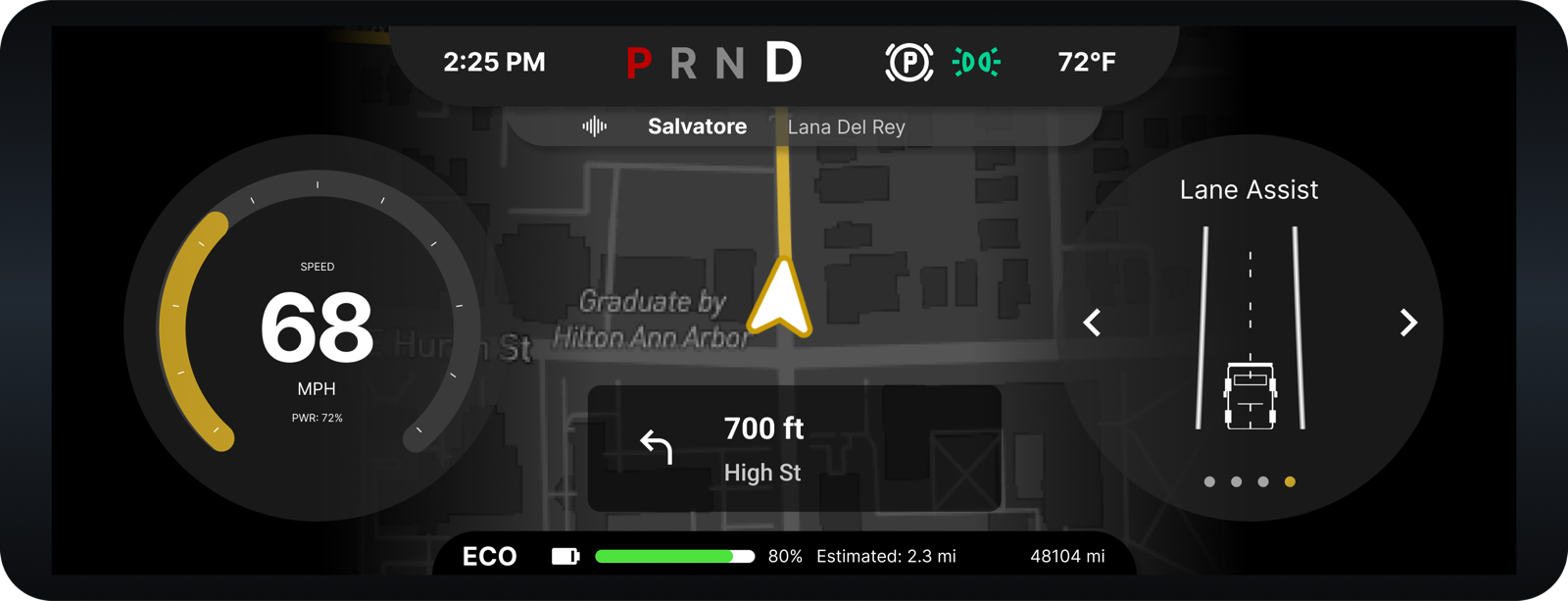
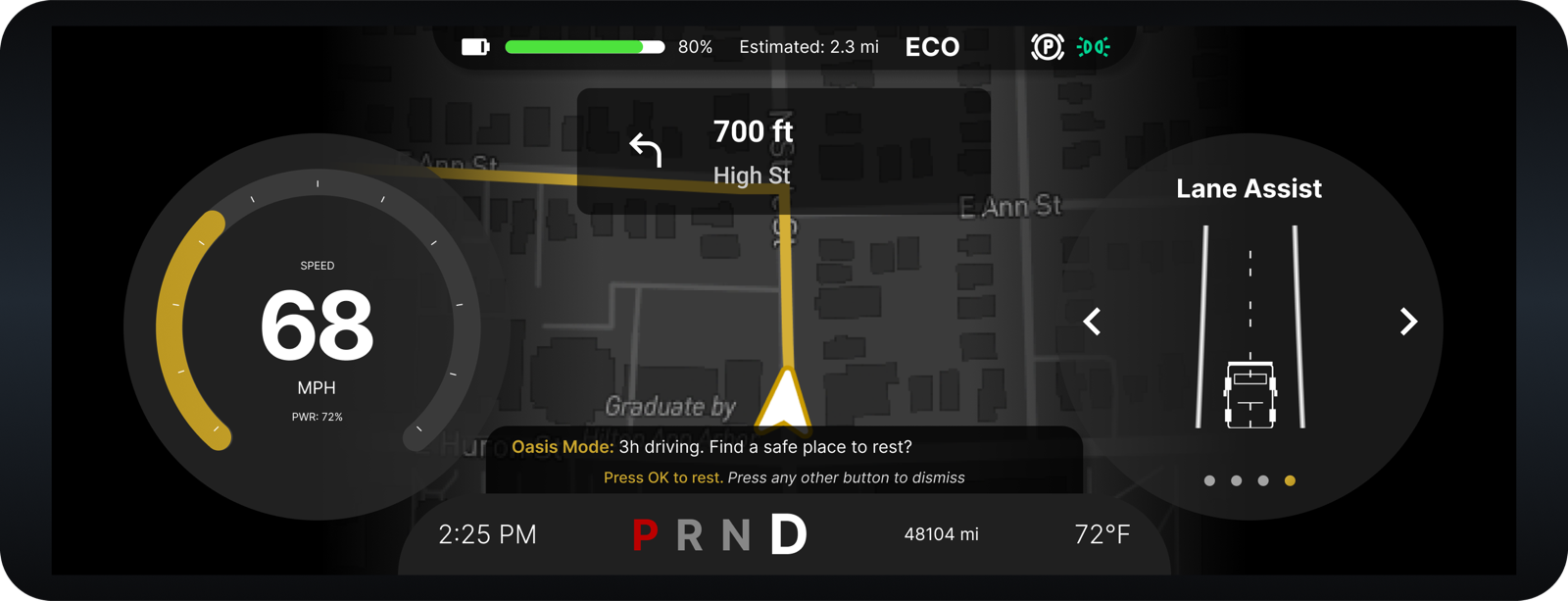
Driver Cluster — Before → After
✦ RESULTS — FEATURE DEEP DIVE
Oasis Mode
Turning the Hummer EV into a personal recovery space
The Problem
Long drives are physically and mentally taxing. But the moment a driver stops — after hours on the highway, a stressful near-miss, or while waiting at a charging station — the car offers nothing. You're sitting in a powerful vehicle with no way to actually recover.
We asked: what if the Hummer EV could actively help you decompress?
Three moments that trigger Oasis Mode
Extended driving
Driver cluster detects fatigue from long drive time and surfaces a rest prompt. One tap opens Oasis Mode.
Stressful incident
A sudden brake or near-miss triggers a gentle prompt to pull over and use Oasis Mode to reset.
Charging stop
While the battery charges, Oasis Mode turns idle wait time into intentional recovery.
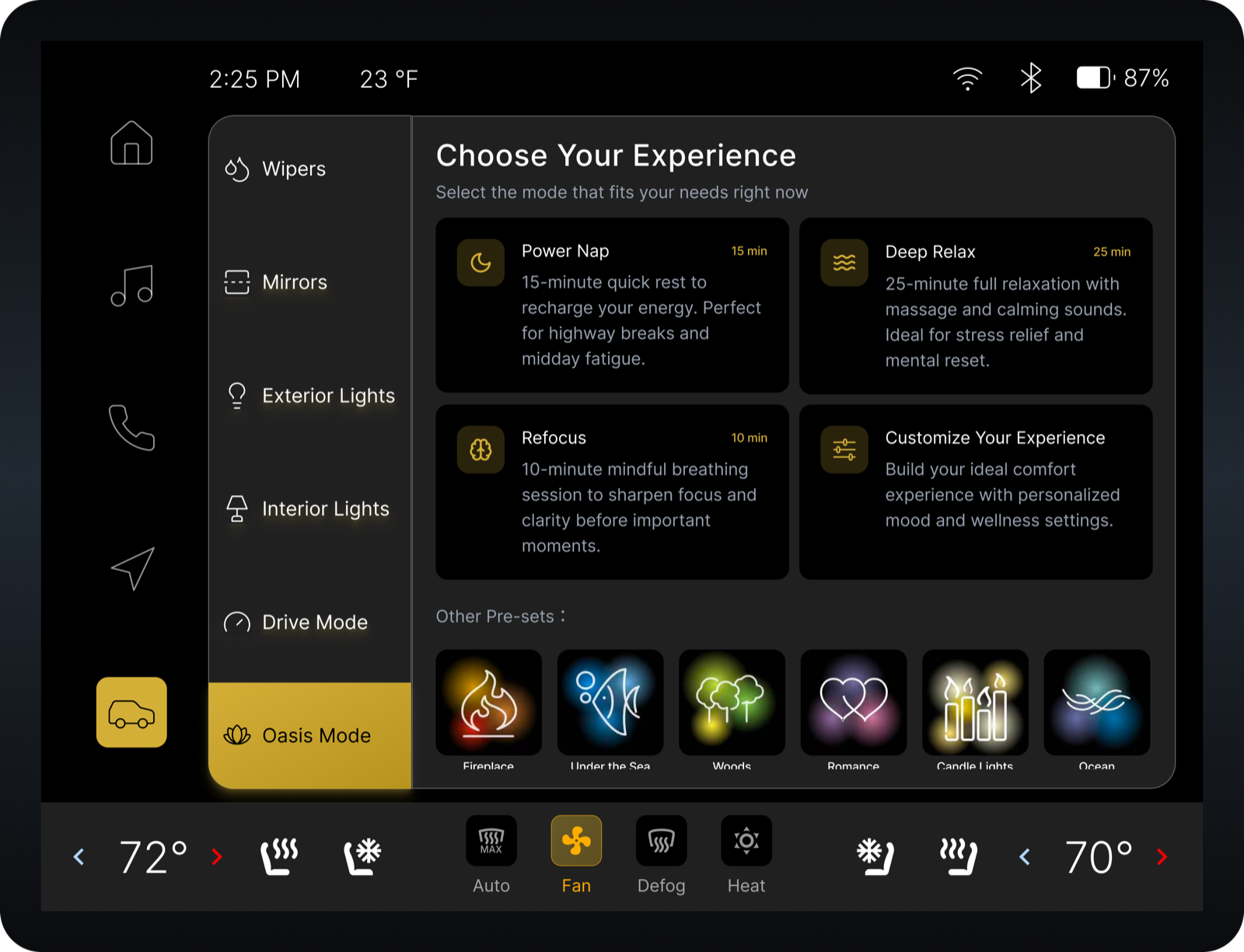
How it works — 3-step flow
Choose your experience
Three named presets with distinct intent — Power Nap (15 min, warming massage + gentle wake alert), Deep Relax (30 min, full body relaxation with calming soundscape for highway fatigue or post-stress), Reflect (mindful breathing to sharpen focus before something important). Or build a custom session.
Customize: Ambiance · Comfort · Duration
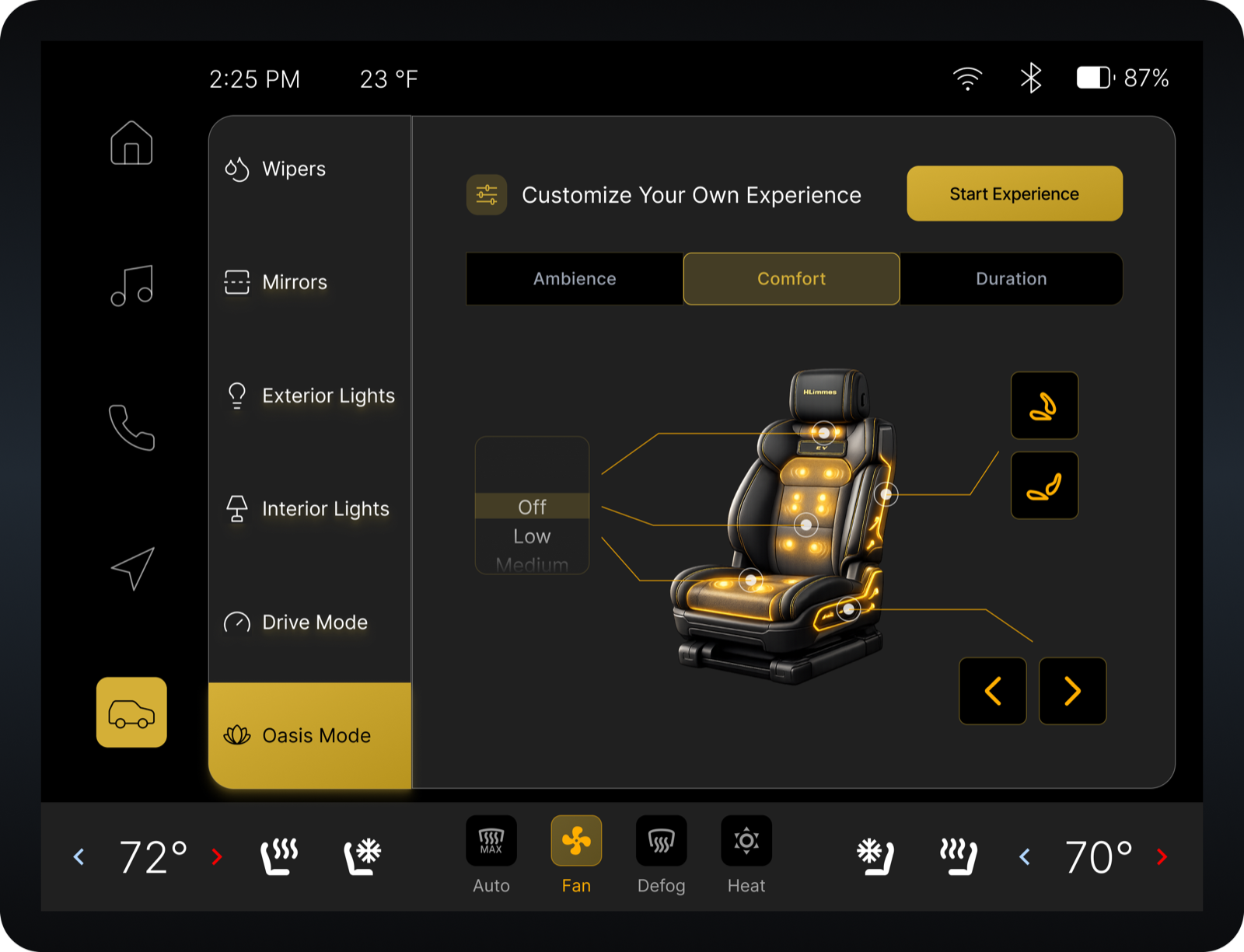
Ambiance — choose cabin lighting color and soundscape (Ocean Waves, Rainfall, etc.). Comfort — control seat massage via an interactive 3D seat rendering: tap the area you want to target rather than navigating abstract zone labels. Duration — set a timer or enable Health Monitor to track heart rate throughout the session.
Session Complete — Recovery Summary
A summary screen shows heart rate before and after, drive score, and a readiness signal — giving the driver confirmation that the session did something before they get back on the road. The driver cluster syncs to reflect the updated recovery state.
Key design decisions
Preset-first, not customization-first
We initially considered leading with a full settings panel. But a fatigued driver doesn't want to make decisions — they want to start recovering now. Named presets with clear intent let you begin in one tap. Customization exists as a layer below, not the entry point. This decision came directly from thinking through the user's emotional state at the moment of activation.
3D seat visual instead of abstract zone sliders
For massage control, we used an interactive 3D rendering of the Hummer seat rather than sliders labeled "Zone 1/2/3." Tapping the seat directly maps to the body area you want targeted — more intuitive, and a stronger visual signature. We considered labeled diagrams too, but the 3D model made the spatial mapping immediate without any explanation.
Recovery summary closes the loop
Most wellness features just stop. We added a Session Complete screen showing heart rate delta and a drive-readiness signal. This closes the loop — the driver leaves with confirmation rather than uncertainty. It also builds trust in the feature over repeated use, turning a one-time novelty into a habit.
✦ ALSO DESIGNED
Guardian Mode
Companion phone app · secondary focus
Key pivot: mobile-first, not car-first
Guardian Mode began as an in-car HMI feature, but the core safety moment happened before the driver re-entered the vehicle. I shifted the experience to a companion app so users could scan surroundings, receive alerts, view camera footage, and take action before approaching the car.
Designed states
✦ MY CONTRIBUTIONS
What I owned
Lead visual designer & Figma system owner
Built the shared component library and layout rules that gave the full IVI system its visual consistency. I was the strongest Figma user on the team and the one others came to for system-level decisions.
Oasis Mode — full design ownership
Originated the concept, designed all flows (preset selection, customization tabs, active session, recovery summary), and the interactive 3D seat interaction model.
Guardian Mode — concept & mobile pivot
Originated the Guardian Mode concept from research and designed the majority of screens. Identified the use case mismatch early — the core safety moment happens before re-entering the car — and pivoted from in-car HMI to a companion phone app.
Central cluster — IA & core pages
Defined the information architecture of the central cluster and designed the Home, Media, Phone, and Navigate pages.
✦ REFLECTION
What designing for a real client taught me
The GM engagement was the first time I'd designed under a real client constraint — not just a class brief, but actual NDA terms, scheduled milestone reviews, and a team that would present to GM design leads. That pressure changed how I made decisions.
The use case matters more than the medium
The Guardian Mode pivot was the most important design decision I made in this project. The original brief assumed security features belonged in the HMI — but thinking through the actual safety scenario made it obvious: if someone feels unsafe approaching their vehicle, their phone is what they reach for, not an in-car screen they can't access yet. Catching that mismatch early saved a full round of rework and became a stronger concept for the client presentation.
A component system is a communication tool
Building the shared Figma component library early wasn't just an efficiency decision — it was how the team stayed aligned across a system with 40+ screens. When someone asked "should this button be primary or secondary?", the answer was already in the library. I came out of this project with a much clearer view of when a component system pays off versus when it adds overhead for smaller projects.
If I had more time
I'd want to test Oasis Mode's preset structure with actual drivers — particularly the naming and ordering of presets, and whether the recovery summary screen lands as useful or as data overload. The 3D seat interaction model is the feature I'm most proud of conceptually, but it also needs the most real-world validation: does tapping a physical rendering feel intuitive in a car context, or does it require more visual explanation?
Want to see the full prototype?
Complete flows for Oasis Mode, Guardian Mode, and the core IVI system are available for verified recruiters. Reach out and I'll share access.
Request Full Access