Sceneo
A mobile app concept designed to make attending live performances easier, clearer, and more social.
ROLE
UX Researcher & Designer
TIMELINE
Aug – Oct 2025
TEAM
Solo Project
TOOLS
Figma, Personas, Journey Mapping
Hana wants to see a musical with her friends this weekend. She checks one site for listings, another for reviews, a third to compare seat prices. Half an hour later, the group chat has gone quiet and nobody's made a decision. She's not even sure which section has a decent view. It should be fun — but planning it feels like a part-time job. They end up going to the movies instead. It's easier.
How might we make discovering and planning a live show as effortless as deciding to watch a movie?
✦ SITUATION
Too much friction between "I want to go" and "I have tickets"
Students who enjoy live theater face a surprisingly fragmented planning experience. Listings are on one site, seat previews on another, friend recommendations in a group chat, and ticket splitting requires switching to a payment app. The result: decision fatigue, dropped conversations, and plans that never materialise.
Key pain points from interviews
- • Hard to compare shows across platforms
- • Seat quality is unclear before buying
- • Friends' opinions are scattered across chats
- • Splitting ticket costs requires a separate app
What students actually need
- • All shows in one place with clear info
- • Visual seat previews before committing
- • Friend activity and recommendations
- • Effortless cost sharing built in
✦ TASK
Make going to a show feel as easy as going to a movie
I conducted 3 semi-structured interviews with student theatergoers — asking about their process for finding shows, choosing seats, and coordinating with friends. I also drew on my own experience as a regular musical attendee to pressure-test findings. Themes were synthesized into two personas and a user journey map that tracked emotions from discovery through post-show.
"I usually end up on three different websites before I can even figure out which shows are happening this week. By the time I've compared them, I'm too tired to actually buy."
— Interviewee, 21, frequent theatergoer
"Splitting the tickets is always awkward. Someone pays for everyone and then we're chasing them on Venmo for a week. It kills the vibe."
— Interviewee, 22, goes to shows in groups of 4–5
"I genuinely cannot tell if a seat is good until I'm sitting in it. I've been disappointed too many times to buy anything above row M without a seat view."
— Interviewee, 20, attends 2–3 shows per semester
Key themes from research
3/3
used multiple platforms to find and compare shows
#1
friction point: seat quality unknown before purchase
100%
coordinated via group chats — no shared decision layer
✦ COMPETITIVE ANALYSIS
What existing platforms get right — and wrong
I audited the three most-used platforms among interviewees: TodayTix, StubHub, and Goldstar. Each covers part of the experience but none integrates social coordination or built-in cost splitting.
TodayTix
Strong: last-minute discovery, clean UI
Weak: no seat preview, no social layer, no splitting
StubHub
Strong: wide inventory, seat maps
Weak: overwhelming interface, resale pricing confusing, no friend features
Goldstar
Strong: discounted student tickets
Weak: dated UX, no social discovery, no group coordination
The gap: No existing platform combines discovery, social coordination, visual seat preview, and cost splitting. Users currently switch between 3–4 tools to complete one booking.
✦ ACTIONS
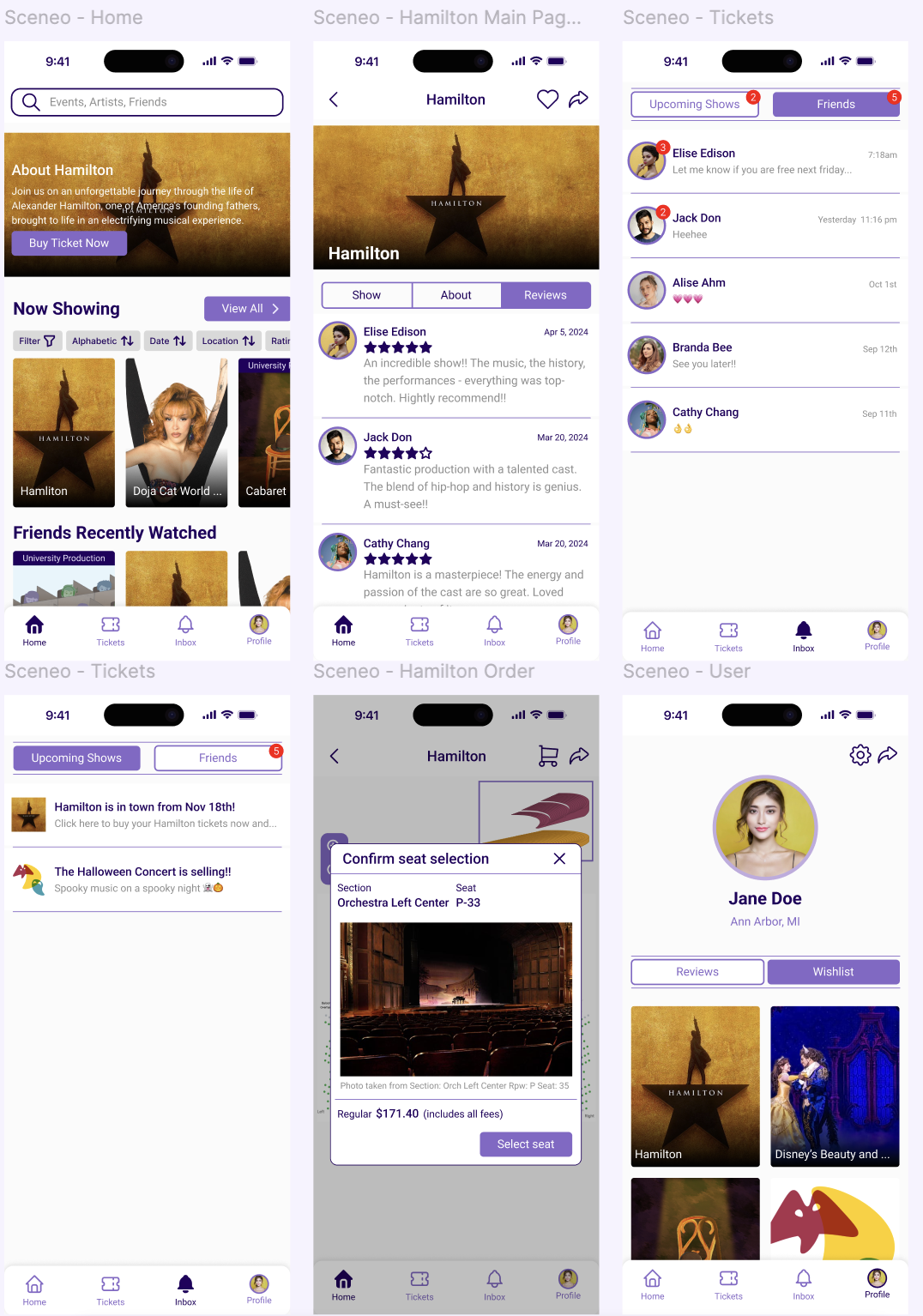
Lo-fi to hi-fi through three rounds of feedback
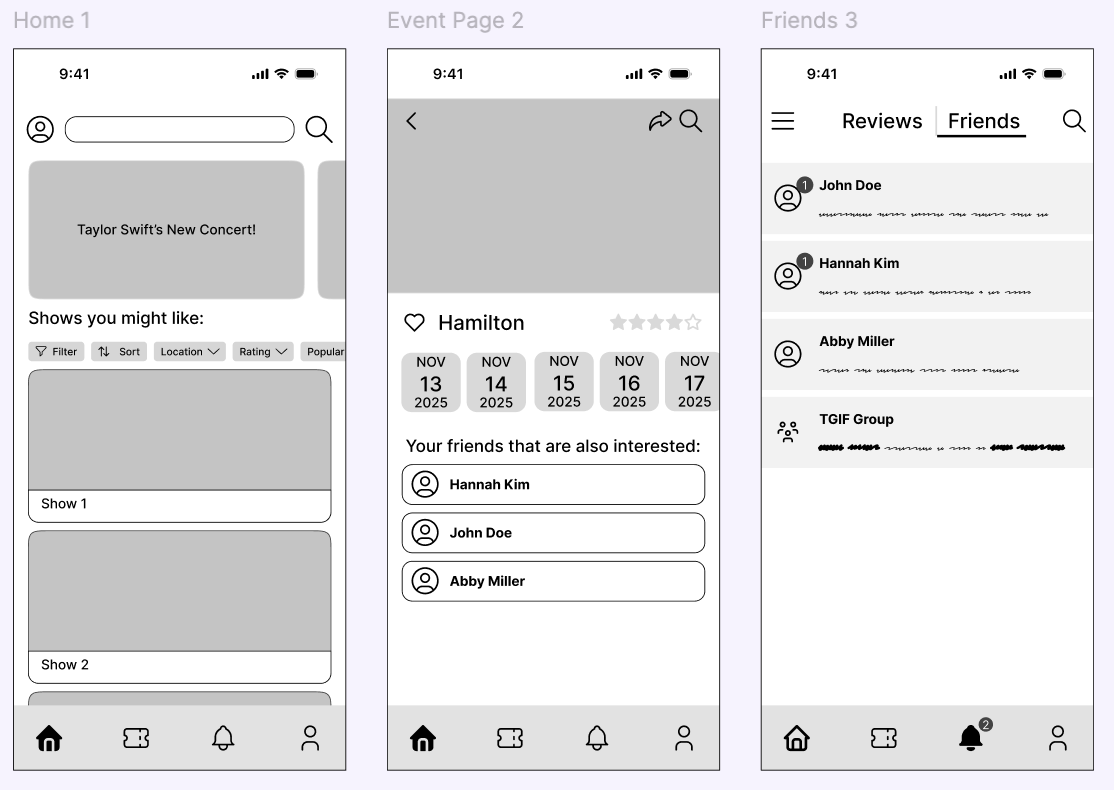
Round 1 — Card clarity and visual style
Card layouts felt outdated and cluttered. Redesigned the grid with cleaner images, tighter hierarchy, and more breathing room — making show browsing feel closer to a streaming app than a ticketing site.
Round 2 — Age and PG rating filters
Feedback flagged that students with families or non-traditional schedules needed content filters. Added PG/age rating to the filter bar — a small addition that meaningfully expanded who the app works for.
Round 3 — Spacing and visual consistency
Inconsistent text sizes and a sharp-edged seat preview box broke the visual rhythm. Standardised type scale, adjusted spacing throughout, and rounded the seat preview to match the rest of the system.
✦ RESULTS
Outcome & Reflection
Try the Interactive Prototype
Experience the full user flow and interactions in Figma
View PrototypeAfter revisiting the PRD, I simplified the "friends reaction" feature, improved Venmo-style cost splitting, and refined the seat preview interaction. These changes made the app feel smoother and more realistic for actual student use cases.
Social features need structure, not just a feed
Early versions of the friend activity feed were too open-ended — it wasn't clear what a "reaction" to a show meant or how it drove decisions. I narrowed the feature to friend-attended shows and explicit recommendations, which made the social layer feel purposeful rather than decorative.
Hierarchy is the design problem, not decoration
The three feedback rounds all circled back to the same issue: users couldn't scan quickly enough. Most of my iteration time was spent on information hierarchy — deciding what to show first, what to hide behind a tap, and what could be cut entirely. Visual polish came last and mostly took care of itself once hierarchy was right.
If I had more time
I'd want to run usability testing on the group-booking flow specifically — coordinating multiple ticket holders is the most complex interaction in the app, and I have lower confidence in that flow than in the browsing and seat selection experiences. I'd also explore integrating with Apple Wallet or Eventbrite's API rather than building ticket management from scratch.